
Matt
How to Run NordVPN in Docker (Step-by-Step Guide)
Get a NordVPN Account Here
Running NordVPN inside Docker is the cleanest way to protect specific apps, automate privacy, and keep your host system untouched. Instead of installing a VPN directly on your machine, you route only the containers you choose through a secure VPN tunnel.
This guide walks you through the recommended Docker setup used by power users, homelab builders, and anyone running tools like torrent clients, scrapers, or automation services.
Why Run NordVPN in Docker?
Using NordVPN inside Docker gives you several advantages:
- Route only selected containers through the VPN
- Avoid VPN conflicts with your host OS
- Easily start/stop VPN routing per app
- Ideal for servers, NAS devices, and headless systems
- Clean, repeatable, version-controlled setup
The best practice is to run NordVPN as its own container and let other containers share its network.
Prerequisites
Before you begin, make sure you have:
- Docker installed
- Docker Compose installed
- An active NordVPN account
- Your NordVPN username and password
This guide assumes a Linux-based Docker host (including NAS devices like Synology).
Get an Active NordVPN Account Here
The Recommended Architecture
Instead of installing NordVPN inside every app container, you will:
- Run NordVPN as a standalone container
- Attach other containers to its network
- Force all their traffic through the VPN tunnel
This creates a single, controllable VPN gateway.
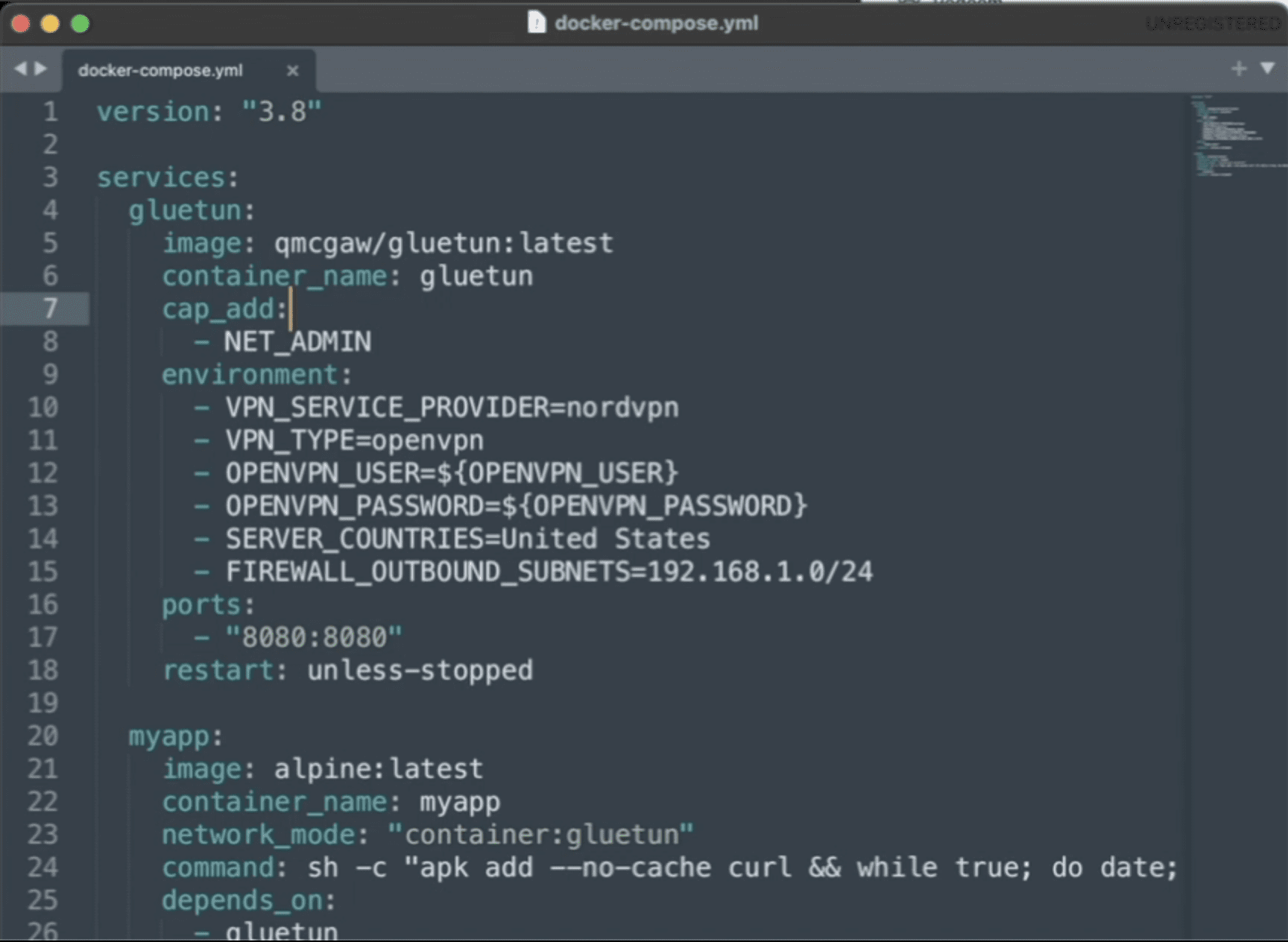
Step 1: Create Your Docker Compose File
Create a new folder and add a file named docker-compose.yml.
What This Does
-
Grants the container permission to create a VPN tunnel
-
Logs into NordVPN automatically
-
Connects to a U.S. server on startup
-
Disables IPv6 to prevent IP leaks
Step 2: Route Another Container Through NordVPN
To force an app to use the VPN, you attach it to the NordVPN container’s network namespace.
Here’s an example using qBittorrent:
Key Line Explained
This forces all traffic from the app container to pass through NordVPN.
Get an Active NordVPN Account Here
Step 3: Expose Ports Correctly (Critical Step)
When containers share a network like this, ports must be exposed on the VPN container, not the app container.
Update the NordVPN service:
Now you can access the app at:
Step 4: Start the Stack
From your project directory, run:
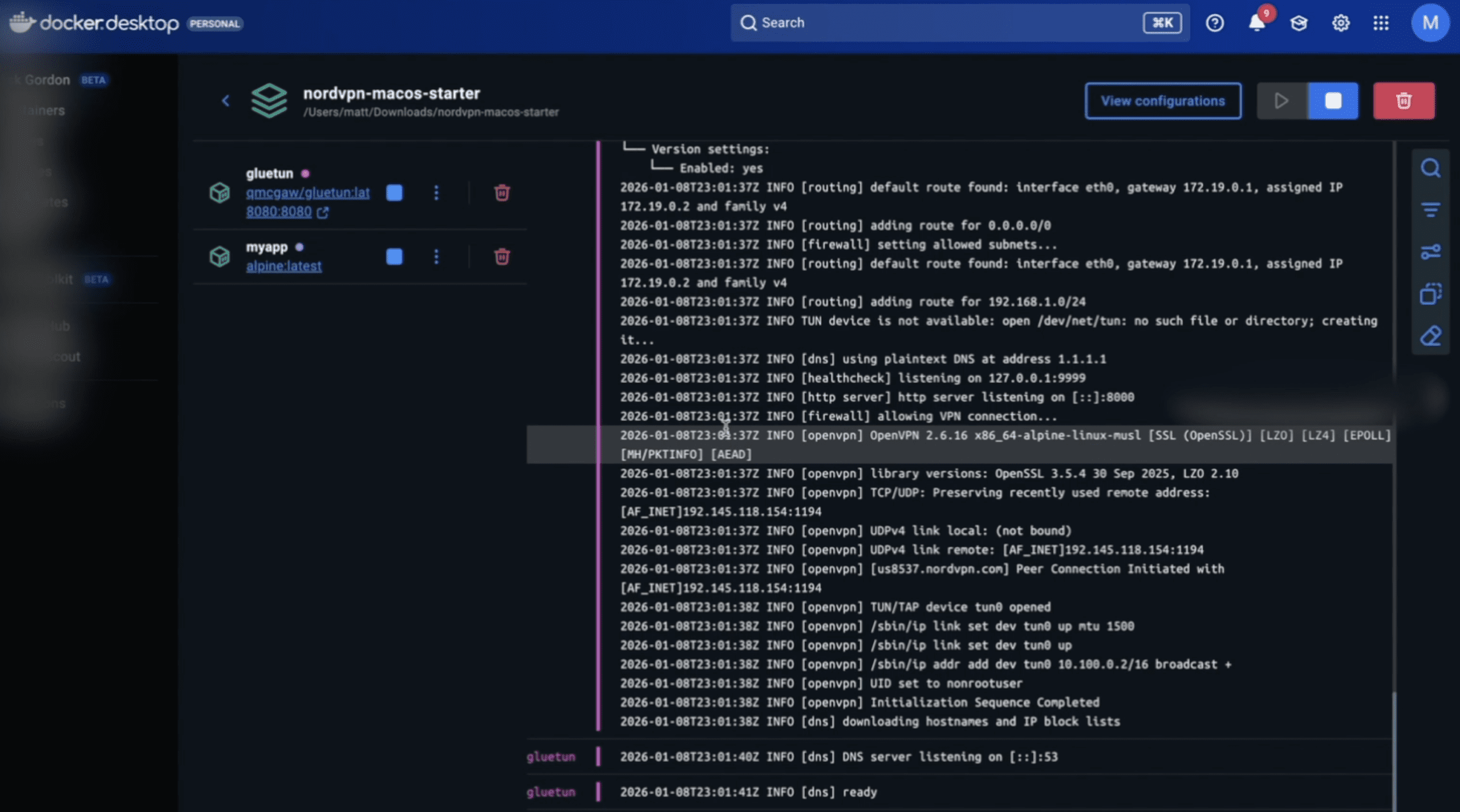
Check the VPN connection:
You should see NordVPN successfully authenticate and connect.
Step 5: Verify the VPN Is Working
Enter the VPN container:
Run:
The IP address returned should be a NordVPN IP, not your home IP.
Any container sharing the VPN network will use this same IP.
Step 6: Add More Containers to the VPN
To route additional services through NordVPN, simply add:
Expose any required ports on the NordVPN container.
Common Mistakes to Avoid
-
Publishing ports on the app container instead of the VPN container
-
Forgetting
NET_ADMINcapability -
Expecting inbound port forwarding (NordVPN does not support it)
-
Mixing VPN and non-VPN traffic in the same container
When to Use a Different VPN Container
If NordVPN authentication changes or you want more flexibility, many users switch to a general-purpose VPN container like Gluetun, which supports NordVPN and many other providers.
The routing concept stays exactly the same.
Final Thoughts
Running NordVPN in Docker is one of the cleanest ways to control privacy, security, and traffic routing in modern containerized setups. Once configured, it’s reliable, portable, and easy to extend.
If you’re running automation tools, scrapers, torrent clients, or server workloads, this setup gives you full control without compromising your host system.
Get an Active NordVPN Account Here
ElevenLabs Pricing Explained (Plans, Credits & API Costs in Plain English)
If you’ve looked at ElevenLabs pricing and thought, “Wait… what’s a credit and how much does the API actually cost?” — you’re not alone.
ElevenLabs uses a credit-based pricing model that’s powerful but poorly explained on the surface. This guide breaks it all down in simple terms so you can confidently answer three questions:
- How much does ElevenLabs really cost?
- How does API pricing work?
- Which plan should I actually choose?
By the end, you’ll know exactly what you’re paying for—and how to avoid overpaying.
Click here to check out ElevenLabs
How ElevenLabs Pricing Works (Big Picture)
ElevenLabs pricing has two layers:
- A monthly subscription plan
- Credits, which act as the internal currency for usage
There is no separate API plan.
Whether you generate audio in the web app or through the API, you spend the same credits from your monthly allowance.
Key idea: If you understand credits, you understand ElevenLabs pricing.
ElevenLabs Pricing Breakdown
What Are Credits (and Why They Matter)
Credits are how ElevenLabs measures usage.
They are consumed when you:
- Convert text → speech
- Generate conversational AI audio
- Transcribe audio (speech-to-text)
In most cases:
- Text-to-Speech consumes credits based on characters
- Conversational AI consumes credits based on minutes of audio
- Higher-quality voices or models may use more credits
Credits reset monthly with your plan. If you run out, you’ll need to buy more or upgrade.
ElevenLabs Subscription Plans (What You Actually Get)
Prices and credit counts can change, but the structure stays consistent.
Free Plan
Best for: Testing and experimentation
- Small monthly credit allowance
- API access included
- No commercial rights
- Limited voices and features
- Good for trying ElevenLabs. Not usable for real projects.
Click here to check out ElevenLabs
Starter Plan
Best for: Hobbyists, light creators, prototypes
- Modest monthly credits
- API access included
- Commercial usage allowed
Works for short voiceovers or small internal tools.
Creator Plan
Best for: YouTubers, podcasters, indie builders
- Significantly more credits
- Better voice options
- API + commercial rights
This is the sweet spot for many users.
Pro Plan
Best for: Heavy creators, SaaS MVPs, agencies
-
Large monthly credit pool
-
Lower effective cost per credit
-
Designed for frequent API usage
Once you’re generating audio at scale, this plan usually makes financial sense.
Scale / Business / Enterprise
Best for: Startups, teams, production systems
- Very high credit volumes
- Priority support, SLAs (Enterprise)
- Negotiated pricing at the top end
If you’re here, you’re optimizing cost per unit—not experimenting.
ElevenLabs API Pricing (The Truth)
Let’s clear up the biggest misconception:
✅ There is no separate API pricing
- API access is included in every plan
- API usage consumes the same credits as the web interface
- No per-request fees
- No hidden API surcharge
You simply authenticate with an API key and spend credits.
Text-to-Speech API Costs (Real-World Explanation)
For standard text-to-speech:
- Credits are consumed based on characters
- Roughly: one credit per character (model-dependent)
Example Scenarios
YouTube voiceover (1,500 words ≈ 9,000 characters):
- ~9,000 credits
Podcast intro + outro (300 words total):
- ~1,800 credits
Blog narration (2,000 words):
- ~12,000–14,000 credits
Higher-quality voices may cost slightly more—but the math stays predictable.
Conversational AI API Pricing
Conversational AI (real-time voice agents, calls, assistants) is billed by the minute, not characters.
Typical pricing:
- Around $0.08–$0.10 per minute, depending on plan and volume
Best use cases:
-
Voice assistants
-
Phone bots
-
WhatsApp or call-based AI agents
-
Interactive voice experiences
This pricing is separate from character-based TTS usage.
Click here to check out ElevenLabs
Speech-to-Text (Transcription) Costs
Speech-to-text consumes credits based on:
-
Audio duration
-
Model used
Common use cases:
-
Podcast transcription
-
Meeting notes
-
Content repurposing workflows
If you’re building a full audio pipeline, factor transcription into your monthly credit needs.
What Happens If You Run Out of Credits?
When you exhaust your monthly credits:
-
Audio generation stops
-
You can:
-
Buy extra credits
-
Upgrade your plan
-
Pro tip:
Upgrading is often cheaper than buying credits repeatedly—especially if your usage is consistent.
Which ElevenLabs Plan Should You Choose?
Choose Starter if:
-
You’re experimenting
-
Usage is light
-
You don’t need much audio each month
Choose Creator if:
-
You’re a YouTuber or podcaster
-
You generate voiceovers regularly
-
You’re building small tools with the API
Choose Pro if:
-
You’re running a SaaS MVP
-
Audio is core to your product
-
Predictable monthly usage matters
Choose Business / Enterprise if:
-
You need volume pricing
-
You need support guarantees
-
Audio is mission-critical
Click here to check out ElevenLabs
Pros & Cons of ElevenLabs Pricing
Pros
-
API included on all plans
-
Simple usage model once understood
-
Excellent voice quality
-
Scales cleanly from hobby to enterprise
Cons
-
Credits feel abstract at first
-
Pricing page lacks real examples
-
Not always cheapest at extreme scale
ElevenLabs vs Other TTS Providers (Quick Take)
ElevenLabs usually wins on:
-
Natural voice quality
-
Emotional tone
-
Ease of integration
Alternatives may win on:
-
Raw volume cost
-
Deep cloud ecosystem integration
If voice quality matters, ElevenLabs is usually worth the premium.
Final Verdict: Is ElevenLabs Worth the Price?
ElevenLabs is priced for quality and developer flexibility, not commodity audio.
If you:
-
Care about how voices actually sound
-
Want API access without complexity
-
Plan to scale usage gradually
Then the pricing model makes sense—and becomes very predictable once you understand credits.
Want to see how to use ElevenLabs audio cleanup feature?
FAQ
Does ElevenLabs charge extra for API usage?
No. API usage uses the same credits as the web app.
Are credits shared between UI and API?
Yes.
Can I use ElevenLabs commercially?
Yes, on paid plans.
What happens if I exceed my monthly credits?
You’ll need to buy more credits or upgrade.
Is ElevenLabs cheaper at higher tiers?
Yes. The effective cost per credit drops as you scale.
Click here to check out ElevenLabs
Docker Commands Cheat Sheet
If you use Docker long enough, you eventually hit the same wall:
-
Containers are running… but nothing works
-
Logs are empty or useless
-
You forget the exact command to “just get inside the thing”
-
Disk space mysteriously vanishes
This Docker cheat sheet isn’t a full reference manual.
It’s the 90% of Docker commands you’ll actually use, written in plain English, so you can move fast when something breaks. This has the most common Docker Compose ports if you need them.
Bookmark it. You’ll be back.
Docker Mental Model (30-Second Primer)
Before commands, anchor these concepts:
-
Image → A blueprint (read-only)
-
Container → A running (or stopped) instance of an image
-
Volume → Persistent data outside container lifecycle
-
Network → How containers talk to each other
-
Dockerfile → Instructions to build an image
-
Docker Compose → Runs multi-container apps
If this mental model clicks, Docker becomes predictable instead of frustrating.
Container Lifecycle Commands
docker run
Create and start a new container.
Most-used flags:
-
-d→ run in background -
-p 8080:80→ map ports -
--name myapp→ name container -
-v host:container→ mount volume -
--env KEY=value→ environment variable
Example:
docker start
Start an existing container.
docker stop
Gracefully stop a container.
docker restart
Quick reset (stop + start).
docker rm
Delete a container (must be stopped).
Force remove:
Inspecting & Debugging Containers
docker ps
List running containers.
Include stopped containers:
docker logs
View container output.
Follow logs:
docker exec
Run a command inside a running container.
If bash doesn’t exist (Alpine images):
This is your “open the sealed box” command.
docker inspect
View detailed container configuration.
Common uses:
-
Find container IP
-
Check mounted volumes
-
Confirm environment variables
-
Debug port bindings
Image Commands
docker images
List local images.
docker pull
Download an image.
docker build
Build an image from a Dockerfile.
docker rmi
Remove an image.
Force:
Volumes & Persistent Data
docker volume ls
List volumes.
docker volume inspect
See where data lives on disk.
docker volume rm
Delete a volume.
⚠️ This deletes data permanently.
Networking Commands
docker network ls
List networks.
docker network inspect
See connected containers.
docker network create
Create a custom network.
Custom networks = cleaner container-to-container communication.
Docker Cleanup Commands
docker system df
Check disk usage.
docker system prune
Remove unused containers, images, and networks.
Aggressive cleanup:
If Docker is eating your disk space, this is usually the fix.
Docker Compose Cheat Sheet
docker compose up
Start all services.
Detached:
docker compose down
Stop and remove everything.
Remove volumes too:
docker compose ps
List running services.
docker compose logs
View service logs.
docker compose exec
Run a command inside a service.
Docker Debugging Shortcuts (Memorize These)
-
Container won’t start? →
docker logs -
Need shell access? →
docker exec -it -
Port not working? →
docker inspect -
Disk full? →
docker system prune -
Data missing? → check volumes
-
Multiple containers? → Docker Compose
Final Thought
Docker isn’t hard.
It’s just unforgiving when you don’t know which command unlocks which door.
This cheat sheet covers the commands that matter—the ones you’ll actually use under pressure.
Stop Guessing: How to Shell Into Your Docker Containers to Debug Errors
You’ve spun up a Docker container. It’s running, but it’s not behaving correctly. Maybe the application is throwing 500 errors, or maybe it’s just silently failing to connect to the database.
You check docker logs, but the output is cryptic—or worse, empty. You feel locked out.
Docker containers are designed to be “sealed boxes.” This isolation is great for stability and security, but it’s a nightmare for debugging when you need to poke around the filesystem to see what’s actually happening.
You don’t need to rebuild the image or add complex logging just to see what’s wrong. You just need to open a side door.
That side door is docker exec.
In this guide, we’ll walk through how to interactively enter a running container, why the command works, and how to handle edge cases like Alpine Linux or permission errors.
Run Docker Free With $200 DigitalOcean Credit
Step 1: Identify Your Target
Before you can enter a container, you need its unique identifier. Open your terminal and list your running containers:
Bash
docker ps
You will see output that looks like this:
Plaintext
CONTAINER ID   IMAGE          COMMAND                  STATUS          NAMES
a1b2c3d4e5f6   nginx:latest   "/docker-entrypoint.…"   Up 10 minutes   my-web-server
You can target the container using either the CONTAINER ID (the alphanumeric string a1b2c3d4e5f6) or the NAME (my-web-server). The name is usually easier to remember.
Step 2: The Golden Command
To open a shell inside that container, run the following command:
Bash
docker exec -it my-web-server /bin/bash
If successful, your terminal prompt will change. You are no longer on your host machine; you are inside the container, usually logged in as root or the default application user.
From here, you can use standard Linux commands like ls, cat, top, or curl to debug your application from the inside out.
Deconstructing the Command
If you just copy-paste the command, you might not understand why it fails in certain scenarios. Here is exactly what those flags are doing:
-
exec: This tells Docker to run a command inside an existing container (as opposed torun, which starts a new one). -
-i(Interactive): This keeps “Standard Input” (STDIN) open. It allows the container to receive the keystrokes you type. -
-t(TTY): This allocates a pseudo-terminal. It simulates a real terminal environment so you get a command prompt and formatted output. -
/bin/bash: This is the actual command we are running. We are launching the Bash shell program.
Troubleshooting: When /bin/bash Fails
The command above works for 90% of containers (Ubuntu, Debian, CentOS based). However, you will eventually run into an error that looks like this:
OCI runtime exec failed: exec: “/bin/bash”: stat /bin/bash: no such file or directory
This usually happens because you are using a lightweight image, such as Alpine Linux. To keep the image size small, Alpine does not include Bash. It uses the standard Bourne shell (sh) instead.
The Fix: simply change the shell command at the end:
Bash
docker exec -it my-web-server /bin/sh
Advanced Tricks
1. Entering as Root
Sometimes you enter a container, but you are logged in as a restricted user (like www-data or node). If you try to install a debug tool or edit a config file, you’ll get a “Permission Denied” error.
You can force Docker to log you in as the root user (User ID 0) by adding the -u flag:
Bash
docker exec -u 0 -it my-web-server /bin/bash
2. For Docker Compose Users
If you are running your stack via Docker Compose, you don’t need to look up the specific container ID with docker ps. You can use the service name defined in your docker-compose.yml file:
Bash
docker compose exec web_service /bin/bash
A Critical Warning: exec vs. attach
While searching for answers, you might see tutorials recommending docker attach.
Avoid using docker attach for debugging.
-
execcreates a separate process (a side session) alongside your application. -
attachconnects your terminal to the main process running the application (PID 1).
If you are “attached” to the main process and you hit Ctrl+C to exit, you will kill the application and the container will stop. With exec, you can enter and exit freely without affecting the running service.
Want $200 DigitalOcean Credit? Claim It Here
Summary Cheat Sheet
| Goal | Command |
| Standard Shell | docker exec -it <name> /bin/bash |
| Alpine Linux (Lightweight) | docker exec -it <name> /bin/sh |
| Force Root User | docker exec -u 0 -it <name> /bin/bash |
| Using Docker Compose | docker compose exec <service> /bin/bash |
Now that you’re inside, you can check configuration files, verify permissions, or test network connectivity manually. Just remember: containers are ephemeral. Any changes you make to files inside the container will be lost if you delete the container. Use exec for debugging, not for permanent updates.
Stop Hard-Wiring APIs Into Your AI — Meet MCP
If you’ve ever tried building an AI agent that does more than just chat, you already know the pain: every new capability means another API integration. One for your CRM. Another for analytics. Yet another for Cloudflare, Stripe, or Notion.
Each API has its own authentication, data formats, quirks, and limits. And when those change? Your fragile integrations break. Worse, you risk exposing API keys directly inside prompts — a security nightmare.
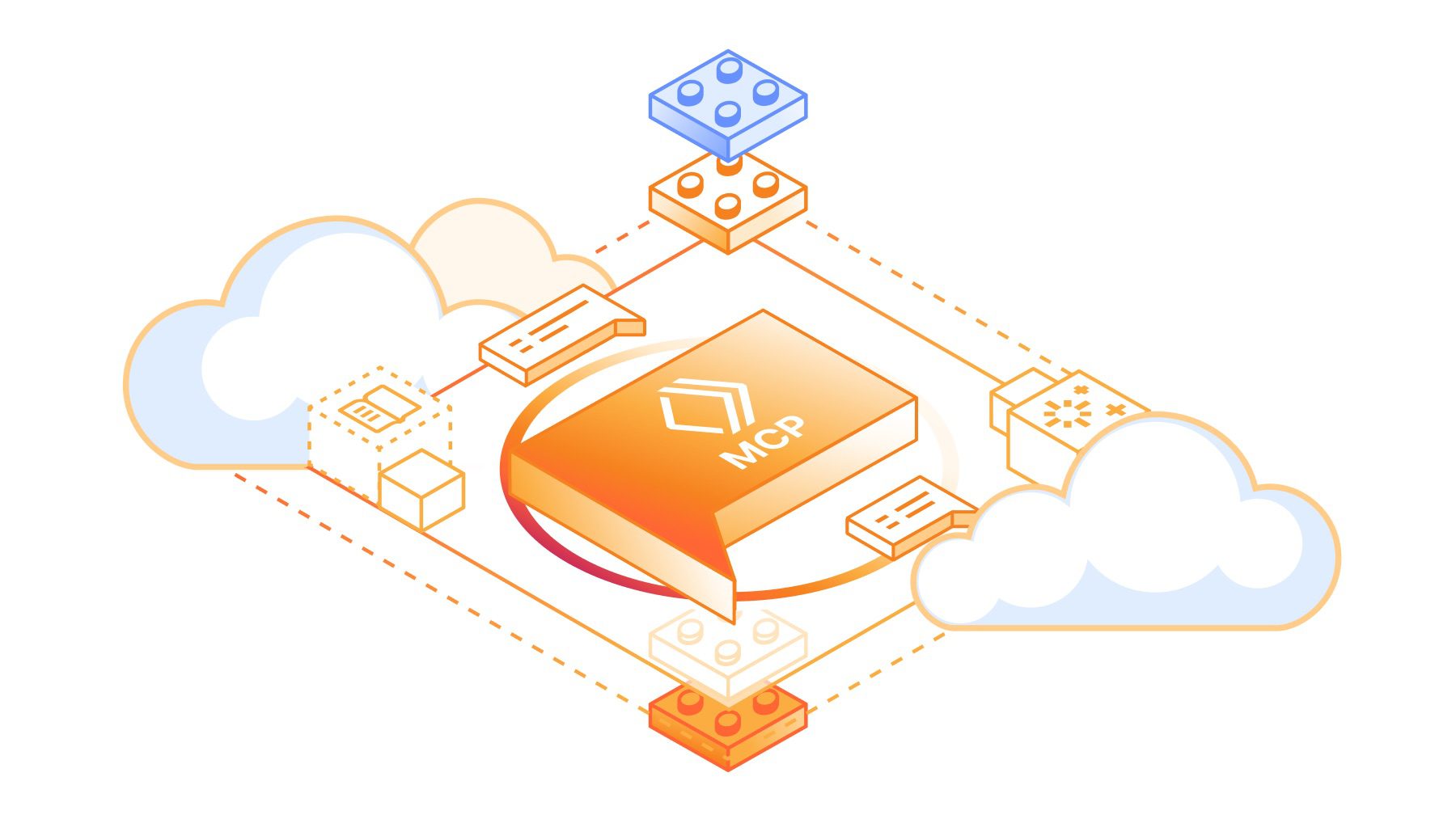
That’s where MCP (Model Context Protocol) comes in. Backed by Cloudflare, Anthropic, and a growing ecosystem of agent platforms, MCP is quickly becoming the “USB-C of AI tools.”
What Is MCP?
MCP — the Model Context Protocol — is an open standard that defines how AI agents connect to external tools, services, and data.
- AI Clients (Hosts): Your agent or AI app (like Claude, Cursor, Windsurf).
- MCP Servers: Services that expose capabilities (like “get DNS records” or “fetch analytics”) in a safe, standard way.
Instead of hard-wiring dozens of APIs into your LLM, you connect it once to MCP. The MCP servers handle the rest.
How MCP Works (Without the Jargon)
Here’s the flow, simplified:
- Handshake: Your AI client connects to an MCP server.
- Tool Discovery: The server says, “Here’s what I can do” — e.g., add firewall rules, query logs, or fetch customer data.
- Action: The AI calls one of those tools based on your request.
- Result: The server executes the action and returns structured results (usually lightweight JSON).
- Response: The AI explains it back to you in plain English.
🔌 Think of it like plugging a laptop into a monitor: your laptop doesn’t need to know the wiring — it just needs HDMI/USB-C. MCP is that universal port for AI agents.
Why MCP Matters for Agent Builders
Here’s why serious AI developers are paying attention:
- Simplicity → Stop reinventing the wheel with custom API wrappers.
- Security → API keys live in the MCP server, not inside an LLM prompt.
- Scalability → Add or swap services without rewriting your agent’s core logic.
- Portability → Works across multiple AI clients — Claude, Cursor, Windsurf, and more.
As someone who’s built integrations the “old way,” I can tell you: managing half a dozen fragile API hookups is not sustainable. MCP replaces that mess with one clean, reliable interface.
Real-World Examples
- Cloudflare MCP Servers: Imagine telling your agent, “Block traffic from Russia” — and it adds the firewall rule through Cloudflare safely via MCP.
- Local MCP Servers: Developers are already spinning up MCP servers to query local databases or run shell commands from within an AI workflow.
- Enterprise MCP Portals: Cloudflare now offers MCP Server Portals (in beta), giving teams dashboards, observability, and fine-grained control over which AI agents can call which tools.
This isn’t theory — it’s happening right now.
Local vs Remote MCP: Where Should You Run It?
- Local MCP: Run a server on your laptop for fast prototyping. Great for dev workflows and personal tools.
- Remote MCP (self-hosted): Use a reverse proxy (like Nginx) if you want your MCP server accessible online.
- Cloudflare-Hosted MCP: Let Cloudflare handle the scaling, TLS, and global edge performance. Perfect for production and enterprise use cases.
Speed isn’t a major bottleneck since MCP deals in small JSON payloads — not big data streams. It’s about control and security, not raw throughput.
The Bigger Picture: MCP as the Standard
Just like USB-C replaced dozens of connectors, MCP is positioned to replace fragile, one-off AI integrations. Anthropic, Cloudflare, and the broader ecosystem are betting on it.
If you’re building AI agents today, MCP isn’t optional for long. It’s the foundation that will make your agents:
- More reliable
- More secure
- Easier to extend
Conclusion: Don’t Reinvent the Wheel
Hard-wiring APIs into your LLM might work for a demo. But if you want to build agents that scale and survive, MCP is the smarter path forward.
Alteryx for Coders: When Low-Code Analytics Makes Sense (and When It Doesn’t)
If you’re a coder, you probably have strong feelings about “no-code” tools. Most of the time, they feel like training wheels bolted onto a bicycle you already know how to ride. Why would you give up the flexibility of Python, SQL, or R for a drag-and-drop interface?
But here’s the thing: Alteryx isn’t just for analysts who don’t know how to import pandas. It’s a data automation and analytics platform that coders can actually get mileage from—if you know where it makes sense.
Let’s unpack what Alteryx does, what it doesn’t, and when it’s worth considering instead of rolling yet another custom ETL pipeline.
What Is Alteryx in Developer Terms?
Think of Alteryx as a pre-packaged mashup of tools you already know:
-
Visual ETL = pandas + SQL + Airflow, but in a drag-and-drop GUI.
-
Predictive Models = scikit-learn starter kits for regression, clustering, and forecasting.
-
Scheduling = cron jobs with logging and error handling built in.
-
Code Integration = Python, R, and SQL scripts inside workflow nodes.
Basically, it’s a way to automate data prep and analytics without hand-coding every single step. You still can inject code where needed—but you don’t have to write all of it.
Features That Actually Matter to Coders
Plenty of marketing glosses over the technical details, so here’s the short list of features coders care about:
-
300+ Data Connectors: Databases, APIs, spreadsheets, cloud warehouses.
-
Automation: Build workflows once, run them on a schedule—no repetitive scripting.
-
Analytics Toolbox: Regression, clustering, geospatial joins, text mining.
-
Custom Scripting: Python, R, SQL snippets live inside workflows.
-
Workflow Sharing: Package processes into apps non-coders can run without breaking your code.
-
Caching & Debugging: Step through data at each node without littering your repo with
print()statements.
Pros: Why Coders Might Actually Like It
-
Faster Prototyping: Instead of coding ETL by hand, drag-and-drop a pipeline and test in minutes.
-
Team Onboarding: Hand workflows to non-technical teammates—no need to train them on pandas or SQL joins.
-
Reusable Workflows: Automate boring data cleanup tasks you’d otherwise script over and over.
-
Hybrid Flexibility: Drop in Python or R whenever the GUI doesn’t cut it.
-
Cross-Team Bridge: Business analysts can run your workflows without pinging you for one-off scripts.
Cons: Why Coders Might Resist
-
The Price Tag: Around $5k/year per license. Compare that to free open-source stacks.
-
Scaling Limits: Workflows run in memory. Big joins on large datasets? Expect crashes.
-
Version Control Pain: No native Git integration. Sharing means emailing
.yxmdfiles like it’s 2005. -
Limited Visualization: Built-in charts are barebones; you’ll still need Tableau, Power BI, or code.
-
Vendor Lock-In: Workflows aren’t portable outside of Alteryx. Pandas scripts? Always will be.
Alteryx vs. Code-First Workflows
If you’re weighing Alteryx against a pure-code stack, here’s the trade-off:
-
Where Alteryx Wins: Speed, automation, and accessibility—especially in enterprise teams.
-
Where Code Wins: Flexibility, cost, scalability, Git-friendly workflows.
-
Hybrid Sweet Spot: Use Alteryx for repetitive prep + scheduling, and save raw code for modeling, APIs, or big-data pipelines.
When a Coder Should Actually Use Alteryx
-
You’re in an enterprise environment where teammates can’t (or won’t) code.
-
You need data cleanup across multiple messy sources—fast.
-
You’re prototyping pipelines before moving them into production.
-
You want to teach or collaborate without diving into regex or nested SQL CTEs.
When to Stick With Code Instead
-
You’re handling massive datasets better suited for Spark, Airflow, or dbt.
-
You’re budget-sensitive (Alteryx isn’t cheap).
-
You need tight version control and prefer Git-based workflows.
-
You dislike GUIs and want every step scripted, logged, and reproducible.
Conclusion
Alteryx isn’t a replacement for code—it’s a force multiplier when you need speed and collaboration. Coders shouldn’t dismiss it as just another no-code toy, but also shouldn’t rely on it exclusively.
If you’re buried in repetitive data prep or spending too much time writing glue code, Alteryx can buy back your hours. Just know that once you’re scaling beyond its memory limits or need production-grade pipelines, Python, SQL, and open-source stacks will always give you more control.
So the real question isn’t “Alteryx vs. code?”—it’s “When do I want a drag-and-drop multiplier, and when do I want raw code?”
White Label SaaS Software Examples: Pros, Cons, and Who Should Sell Them
White-label software is one of the fastest ways to launch a software business without writing a single line of code. Instead of spending years building your own SaaS, you can take an existing platform, rebrand it with your logo, and resell it as your own.
Agencies, consultants, and entrepreneurs are increasingly turning to white-label software to create new revenue streams and strengthen client relationships. But what’s really out there? And is it worth pursuing?
In this guide, we’ll break down 25 white-label software examples, explore the pros and cons of selling them, and show you who each option is best suited for.
What Is White Label SaaS Software?
White-label software is a ready-made product developed by one company and resold by another under their own brand.
Think of it like grocery store brands: the store doesn’t make the cereal, but it rebrands and sells it as its own. With software, this means:
-
You get a fully functional tool (CRM, email marketing, dashboards, etc.).
-
You apply your brand elements (logo, colors, custom domain).
-
You resell it to clients at a markup, keeping the profit.
This makes it possible to enter the software business without heavy development costs or technical teams.
Who Is White Label Software For?
White-label software works best for:
-
Agencies (marketing, SEO, web design, HR) – who want to provide clients with tools beyond services.
-
Consultants & Coaches – who want to add digital platforms to their offerings.
-
SaaS Founders – who want to expand features without building from scratch.
-
Niche Specialists (dentists, gyms, real estate, healthcare, etc.) – who want to package software for a specific vertical.
Top 25 White Label Software Examples
Here are 25 proven platforms you can rebrand and resell.
🔹 Email Marketing & Automation
-
Moosend – Affordable email marketing automation with white-label branding.
-
CakeMail – Multilingual, lightweight email platform ideal for small businesses.
-
ActiveCampaign – Advanced marketing automation and CRM with reseller options.
-
Howuku – CRO platform offering heatmaps, session replays, and A/B testing.
🔹 Dashboards & Analytics
-
AgencyAnalytics – SEO, PPC, and social reporting dashboards with client logins.
-
Klipfolio – Real-time business dashboards for data consultants and agencies.
-
DashThis – Marketing dashboard builder with custom branding.
-
DashClicks – All-in-one agency management with white-label reporting.
🔹 CRM & All-in-One Platforms
-
GreenRope – CRM with sales, marketing, and project management features.
-
AllClients – Simple, consultant-friendly CRM with rebranding options.
-
GoHighLevel – Popular “SaaS-in-a-box” CRM and funnel builder for agencies.
🔹 Website & Funnel Builders
-
Simvoly – Combines websites, funnels, and e-commerce in one platform.
-
Weblium – Drag-and-drop site builder with white-label plans.
-
WordPress – Open-source CMS easily white-labeled with plugins.
-
Landingi – Landing page builder with custom domain support.
-
Convrrt – Landing page builder that integrates directly into SaaS platforms.
-
Duda – Website builder tailored for agencies, with client dashboards.
🔹 Chatbots & Lead Capture
-
WotNot – No-code chatbot platform with agency-focused licensing.
-
Mailmunch – Lead capture forms, pop-ups, and email tools.
-
VivifyScrum – Agile project management with white-label branding.
-
Zapier – Integration platform with embeddable automation APIs.
🔹 Payroll, HR & E-commerce
-
Playroll – Global payroll and Employer-of-Record platform.
-
Ecwid – E-commerce platform that plugs into websites and apps.
-
Magento (Adobe Commerce) – Enterprise-level e-commerce with partner programs.
🔹 ERP & Operations
-
Sellful – AI-powered ERP (websites, CRM, invoicing, POS) built for agencies to resell.
(Tip: Include screenshots, logos, or comparison tables for EEAT credibility.)
Pros of Selling White Label Software
-
✅ Fast time to market – Launch in weeks instead of years.
-
✅ Lower costs – Avoid millions in dev and server infrastructure.
-
✅ Recurring revenue – Subscription model builds predictable income.
-
✅ Brand authority – You look like a software provider, not just a service vendor.
-
✅ Scalable – Multi-tenant platforms let you onboard dozens of clients easily.
Cons of Selling White Label Software
-
❌ Vendor lock-in – You rely on the developer’s uptime and updates.
-
❌ Limited customization – Branding is flexible, but features are usually fixed.
-
❌ Licensing costs – Vendors typically charge monthly fees per client or per seat.
-
❌ Support burden – Clients expect you to handle troubleshooting.
-
❌ Competition risk – Many resellers may use the same platform.
How to Choose the Right White Label Software
-
Match your niche: Pick tools your target clients already need (dentists = appointment CRM, agencies = dashboards).
-
Vet the vendor: Look for solid uptime, security, and compliance certifications.
-
Check pricing model: Ensure margins work after licensing costs.
-
Consider scalability: Can it handle 5 clients today and 500 tomorrow?
-
Support model: Know who answers the phone when clients need help — you or the vendor.
FAQs About White Label Software
-
What’s the difference between white-label and private-label software?
White-label is made for reselling at scale, while private-label often means a custom single deployment. -
Is it profitable for small businesses?
Yes — especially when bundled with services like marketing or consulting. -
Can I add my own features?
Usually not, but some vendors offer APIs or developer programs. -
What industries benefit most?
Marketing, e-commerce, HR/payroll, and niche service businesses.
Expert Tips & Best Practices
-
Start with one platform and test it with a pilot client.
-
Bundle software with services to increase stickiness (e.g., “ads + reporting dashboard”).
-
Use niche positioning to stand out (“CRM for real estate agents” > “generic CRM”).
-
Always have an exit plan in case your vendor changes pricing or goes under.
Conclusion
White-label software is a shortcut into the SaaS world — but success depends on how you package, sell, and support it.
If you’re an agency owner, consultant, or entrepreneur, choosing the right platform could mean the difference between just reselling a tool and creating a true recurring revenue business.
HighLevel vs Kajabi: All-in-One CRM or Course & Content Powerhouse?
For coders, freelancers, and SaaS builders, there’s often a key decision: Do I need a platform to manage clients and automate funnels, or one to host courses and monetize knowledge?
That’s where HighLevel (GoHighLevel) and Kajabi come into play. Both platforms claim to be all-in-one business solutions — but they serve different masters. HighLevel is built as a CRM + funnel + automation hub, while Kajabi is designed as a course and content monetization platform.
Let’s compare them in detail.
Quick Comparison Snapshot
| Feature | HighLevel | Kajabi |
|---|---|---|
| Core Focus | CRM, funnels, automation, multi-channel marketing | Online courses, membership sites, content monetization |
| Pricing | $97–$497/mo flat (unlimited users) | $149–$399/mo (per user, tiered features) |
| CRM & Pipelines | Full CRM & pipeline tracking | Very limited (basic contacts + tagging) |
| Funnels & Websites | Full funnel & website builder | Website & landing page builder (content-first) |
| AI Tools | AI receptionist, chatbot, funnel builder | Basic AI (content generation, emails) |
| Automations | Multi-channel workflows (SMS, email, chat, calls) | Email automation, content drip campaigns |
| White-Label SaaS | Yes | No |
| Best Fit | Agencies, freelancers, SaaS founders | Course creators, coaches, educators |
Our Favorite CRM: Try GoHighLevel Risk Free
HighLevel: The CRM + Funnel Engine
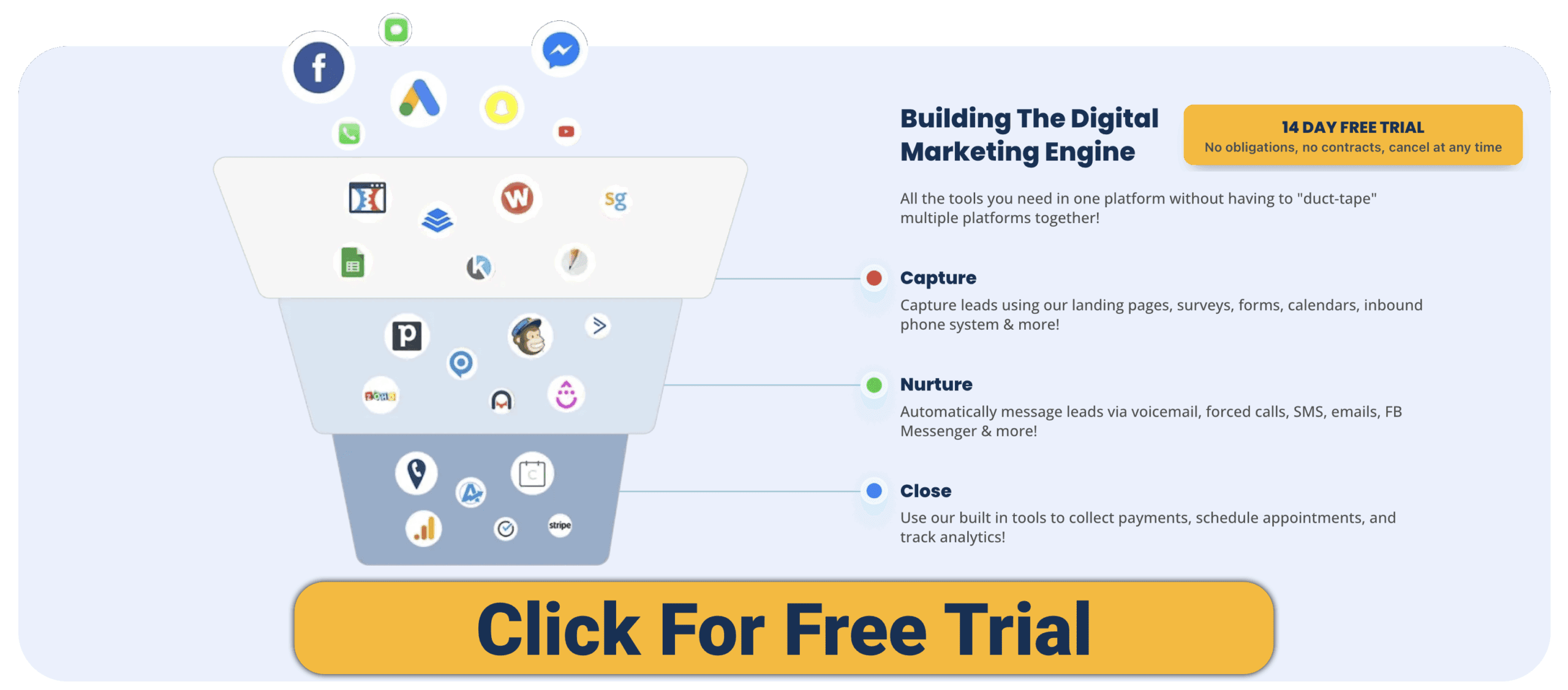
HighLevel is made to help agencies, SMBs, and coders consolidate sales and marketing into one platform.
-
CRM & Pipelines – Manage leads, deals, and client relationships.
-
Funnels & Websites – Drag-and-drop builder for unlimited funnels and pages.
-
Multi-Channel Marketing – Email, SMS, voicemail drops, Messenger, Instagram DMs, live chat.
-
Automations – Visual workflow builder for nurturing and follow-ups.
-
AI Agents – AI receptionist, chatbots, funnel generator.
-
Memberships & Courses – Host digital products (but less polished than Kajabi).
-
White-Label SaaS – Resell HighLevel as your own branded software.
For vibe coders, HighLevel is like a Swiss Army knife for launching and managing businesses quickly — especially useful if you want to resell it as SaaS.
Kajabi: The Course & Content Powerhouse
Kajabi is purpose-built for knowledge businesses — people selling courses, coaching, or memberships.
-
Course Hosting – Upload videos, PDFs, audio, and create structured curriculums.
-
Websites & Landing Pages – Templates optimized for education and coaching.
-
Community Features – Kajabi Communities (built-in forums & group chats).
-
Email Marketing – Automated email campaigns and drip sequences.
-
Checkout & Subscriptions – Integrated payment system for one-time or recurring offers.
-
Analytics – Track student engagement, course completion, and revenue.
-
Integrations – Connects with Zapier, Stripe, and 3rd-party tools.
For coders who are also educators or coaches, Kajabi offers a clean, content-first ecosystem without needing extra plugins.
Pros & Cons
HighLevel Pros
-
Combines funnels, CRM, and automation in one.
-
Flat pricing (no per-user costs).
-
White-label SaaS mode (unique resell model).
-
AI-driven client-facing tools.
-
Multi-channel communication built-in.
HighLevel Cons
-
Course/membership features are basic compared to Kajabi.
-
Learning curve can overwhelm beginners.
-
Limited integrations unless on higher plan.
Kajabi Pros
-
Polished course and content hosting.
-
Integrated payments and subscriptions.
-
Clean UI, easy to set up.
-
Great for coaches and educators.
-
Built-in community features.
Kajabi Cons
-
Pricing increases as you scale.
-
Weak CRM (limited beyond tagging & email).
-
Less flexible for funnels and automations.
-
No SaaS reselling model.
Use Cases for Vibe Coders
-
Freelancers/Agencies → HighLevel makes sense if you manage client leads, pipelines, and want to resell SaaS. Kajabi is only relevant if you offer training.
-
SaaS Founders → HighLevel is ideal for funnels, onboarding, and customer nurturing. Kajabi works for education-based SaaS (customer training or knowledge monetization).
-
Educators/Coaches → Kajabi dominates with polished course delivery, payments, and community features.
-
Coders Who Automate → HighLevel offers prebuilt automation across channels; Kajabi’s automations are mostly email-based.
What Users Say
-
HighLevel: Praised for replacing multiple tools, especially by agencies. Criticism: steeper learning curve, UI clutter.
-
Kajabi: Loved for simplicity and polish. Criticism: expensive, weak CRM, limited funnels.
Our Favorite CRM: Try GoHighLevel Risk Free
FAQs
Which is more coder-friendly?
HighLevel — with workflows, APIs (on higher tiers), and SaaS resell mode. Kajabi is no-code and polished, but not deeply customizable.
Which is better for AI?
HighLevel has AI agents and funnel tools. Kajabi’s AI is limited to content writing.
Which is better for courses?
Kajabi, hands down. HighLevel can host courses, but Kajabi is purpose-built.
Which is more affordable?
HighLevel’s flat pricing can be cheaper for large teams. Kajabi is fine for solo creators but gets costly as you scale.
Final Verdict
-
Choose HighLevel if you need a CRM + funnel builder + automation hub and especially if you want to resell SaaS under your own brand. Great for agencies, freelancers, and SaaS founders.
-
Choose Kajabi if your business is courses, coaching, or memberships and you want a polished, all-in-one content monetization platform.
Bottom line: HighLevel is the CRM + funnel engine, Kajabi is the course & content powerhouse. Coders should decide whether they want to scale clients (HighLevel) or scale content (Kajabi).
Want to see more comparisons? Check out our other posts on CRMs!
n8n Pricing Explained: Which Plan Is Right for You?
Click For More Info On N8N Pricing
n8n is a powerful open-source workflow automation tool trusted by developers and growing teams who need flexibility without vendor lock-in. But with multiple cloud and self-hosted tiers, the pricing can feel confusing at first glance. This guide breaks down every n8n plan, what you actually get for your money, and exactly how to pick the right one — whether you’re just getting started or scaling a production automation stack.
Already know n8n is the right tool but unsure how it stacks up against the competition? Check out our comparisons: n8n vs Zapier, n8n vs Microsoft Power Automate, and the best n8n alternatives.
How n8n Pricing Works: Executions, Not Tasks
Before comparing plans, it’s worth understanding n8n’s core pricing unit: the workflow execution. One execution equals one full workflow run from start to finish — regardless of how many steps or nodes that workflow contains.
This is meaningfully different from tools like Zapier, which charge per individual task (step). For complex, multi-step automations, n8n’s execution-based model is often significantly cheaper. To estimate your needs, multiply the number of workflows you plan to run by how frequently each runs per month.
n8n offers two deployment paths: Cloud (hosted and managed by n8n) and Self-Hosted (you run it on your own infrastructure). Each path has its own pricing structure.
n8n Cloud Plans (Hosted by n8n)
Cloud plans are the fastest way to get started. No servers, no Docker, no maintenance — n8n handles uptime, updates, and infrastructure. If you’d rather run things yourself, skip ahead to the self-hosted options below.
Click here to see the latest pricing
| Feature | Starter ($20/mo) | Pro ($50/mo) | Enterprise (Custom) |
|---|---|---|---|
| Executions / Month | ~2,500 | ~10,000 | Custom |
| Workflows / Steps / Users | Unlimited | Unlimited | Unlimited |
| Concurrent Executions | ~5 | ~20 | 200+ |
| Shared Projects | 1 | 3 | Unlimited |
| Execution Insights | Short-term | 7 days | 365 days |
| Admin Roles & Global Variables | — | Yes | Yes |
| Environments | — | — | Yes |
| Git / Log Streaming / SSO | — | — | Yes |
| Support | Forum | Email + Forum | SLA / Priority |
Starter — $24/month (or $20/month billed annually)
The Starter plan is built for solo developers and early-stage projects who want managed hosting without a big monthly bill.
- ~2,500 workflow executions/month
- Unlimited workflows, steps, and users
- 1 shared project; ~5 concurrent executions
- Short-term execution logs
- Community/forum support
Best for: Personal projects, freelancers, or teams just beginning to automate. If you’re still exploring what n8n can do, this is the cheapest managed option. You can also get started for free by trying n8n’s free tier before committing.
Limitation to watch: 2,500 executions/month sounds like a lot, but if you’re running high-frequency workflows (e.g., webhook-driven triggers that fire dozens of times per day), you can hit this ceiling quickly. Calculate your expected volume before committing.
Pro — $60/month (or $50/month billed annually)
The Pro plan is the sweet spot for most growing teams running real production workloads.
- ~10,000 executions/month
- Unlimited workflows, steps, and users
- 3 shared projects; ~20 concurrent executions
- 7-day execution insights and execution search
- Admin roles, global variables, and workflow history
- Email + forum support
Best for: Teams building serious internal tools, client automations, or connecting multiple departments. The jump to 10,000 executions plus admin controls makes this the practical choice once you’ve outgrown Starter. If you’re using n8n’s API for workflow management at scale, Pro is also the minimum cloud tier you’ll need for API access.
Enterprise (Cloud) — Custom Pricing
Built for organizations with compliance requirements, large teams, or high-volume automation needs.
- Custom execution volume with unlimited workflows, steps, and users
- Unlimited shared projects; 200+ concurrent executions
- 365-day execution insights
- SAML/LDAP SSO, multiple environments, log streaming
- SLA-backed priority support and invoice billing
Best for: Enterprise teams that need SSO, audit trails, dedicated environments, and guaranteed uptime SLAs. Contact n8n directly for a quote.
Self-Hosted n8n Options
Self-hosting gives you full control over your data, infrastructure costs, and execution limits. It’s the path most developers take when they need to run high volumes of automations without per-execution fees. If you’re considering this route, our guides to self-hosting n8n with Docker Compose and deploying n8n on DigitalOcean walk through the full setup step by step.
Community Edition (Self-Hosted) — Free
- Completely free — no execution limits
- Unlimited workflows, executions, and users
- Full access to core features and all 400+ integrations
- Community forum support
Best for: Developers, hobbyists, and small teams comfortable managing their own servers and updates. The marginal cost per execution is essentially zero once your server is running, making this the most cost-effective option for high-volume automation. The trade-off: you’re responsible for uptime, security patches, and backups.
Who should skip it: Non-technical teams or anyone who doesn’t want the overhead of server management. In those cases, the cloud plans will save you time and headaches that often cost more than the subscription fee.
Business (Self-Hosted) — Paid (Contact n8n)
- Advanced collaboration features and user management
- Multiple environments (staging/production separation)
- Built-in Git versioning for workflows
- SSO options (SAML/LDAP), execution insights, and log streaming
Best for: Larger engineering teams that want to self-host for cost or data sovereignty reasons but need enterprise-grade features like SSO and Git-based workflow versioning. This tier makes n8n behave like a proper DevOps-integrated platform — you can treat workflows as code, version them in Git, and deploy via CI/CD. This is especially relevant if you’re building on top of the n8n API to manage workflows programmatically.
Enterprise (Self-Hosted) — Custom Pricing
- Everything in Business, plus 200+ concurrent executions
- Extended retention and audit logging
- SLA-backed support
Best for: Large organizations with strict compliance requirements (GDPR, HIPAA, CCPA) who need their data to stay on-premises. As covered in our n8n vs Power Automate comparison, data sovereignty is one of n8n’s biggest advantages over cloud-only competitors.
Startup Plan — ~$400/month
n8n offers a special discounted plan for eligible early-stage companies:
- Historically priced around $400/month
- Eligibility: typically ≤20 employees and less than $5M in funding
- Includes premium features from higher cloud tiers
If your company qualifies, reach out to n8n directly. This plan gives startups access to Pro/Enterprise-level capabilities at a fraction of the cost while they scale.
Which n8n Plan Should You Choose?
Here’s a quick decision framework based on where you are:
- Exploring n8n for the first time? Start with the free Community Edition (self-hosted) or the Starter cloud plan if you want managed hosting. Both let you build real automations with no commitment.
- Running production workflows for a team? Pro is the right call. The jump to 10,000 executions, 7-day insights, and admin roles is worth the $50/month the moment your automation stack becomes business-critical.
- High-volume or high-frequency automations? Self-hosted Community is almost always the cheapest option. Pair it with a $10–20/month VPS and your cost per execution approaches zero. See our guide to running n8n via Docker Compose to get set up in under 30 minutes.
- Need SSO, compliance, or dedicated environments? Business or Enterprise (cloud or self-hosted) are your only options. Contact n8n for pricing.
- Eligible startup? Always ask about the Startup Plan before signing up for Pro or Enterprise.
Don’t Just Read About It — Launch Your Own AI Workflow with n8n (No Cost)
Pros and Cons by Plan
- Community (Self-Hosted) — Pros: Free, unlimited executions, maximum data control. Cons: You own hosting, security patches, and uptime.
- Starter (Cloud) — Pros: Low cost, zero infrastructure overhead, easy to start. Cons: 2,500 execution cap, forum-only support.
- Pro (Cloud) — Pros: 10,000 executions, execution search, admin roles, email support. Cons: Still execution-capped; high-frequency use cases can still hit limits.
- Business (Self-Hosted) — Pros: Git versioning, SSO, environments — full DevOps integration. Cons: Paid license, you still manage infrastructure.
- Enterprise (Cloud or Self-Hosted) — Pros: Compliance-ready, SLA support, 200+ concurrency, longest audit retention. Cons: Custom/high pricing; likely overkill unless you have real enterprise requirements.
How n8n Compares to Alternatives on Pricing
Pricing doesn’t mean much in isolation. Here’s context on how n8n’s model compares to the tools most people consider alongside it:
- vs. Zapier: Zapier charges per task (each step in a Zap), which makes complex multi-step workflows expensive fast. n8n charges per execution regardless of steps, making it dramatically cheaper for sophisticated automations. Full breakdown: n8n vs Zapier.
- vs. Microsoft Power Automate: Power Automate’s licensing is notoriously complex — per-user plans, per-flow plans, premium connector add-ons. n8n’s model is far more predictable. Especially for high-volume background processes, self-hosted n8n often wins on cost by a wide margin. Full breakdown: n8n vs Power Automate.
- vs. Make (formerly Integromat): Make charges per operation (each module/step), similar to Zapier. n8n’s execution model remains more predictable for complex workflows. See n8n alternatives for a broader comparison.
- vs. Node-RED: Node-RED is free and open-source but built for IoT/event-driven hardware use cases, not SaaS business workflows. Different tools for different jobs. Full breakdown: n8n vs Node-RED.
Going Further: Building with n8n
Once you’ve chosen your plan, the real value of n8n comes from what you build. A few resources to help you get the most out of the platform:
- n8n AI Agent — Build LLM-powered workflows with GPT-4, Claude, and other models using n8n’s built-in AI Agent node. No boilerplate required.
- n8n API — Manage and trigger workflows programmatically. Essential for teams building automation into their own SaaS products.
- n8n vs LangGraph — If you’re building advanced AI agents and wondering whether to use n8n’s visual interface or write your own LangChain/LangGraph code, this comparison is for you.
- n8n vs Airflow — Understanding when to use n8n for business automation vs. Airflow for data pipelines is a common architectural question for growing engineering teams.
FAQ: n8n Pricing, Executions & Support
What counts as one execution?
One full workflow run from trigger to completion, regardless of how many nodes or steps it contains. A 20-step workflow triggered once = 1 execution.
How do I estimate how many executions I need?
Multiply the number of workflows you plan to run by how frequently each one triggers per month. For example: 5 workflows each triggered 200 times/day = 30,000 executions/month. That would require the Pro plan at minimum on Cloud, or self-hosting for the most cost-effective option.
What happens if I exceed my execution limit?
On cloud plans, n8n typically pauses workflows until the next billing cycle or prompts you to upgrade. Check your cloud dashboard to monitor usage before hitting limits.
Can I switch between cloud and self-hosted?
Yes. Workflows are portable as JSON files, so you can export from cloud and import into a self-hosted instance (or vice versa). This also means you can version control your workflows in Git — a major advantage over closed-platform competitors.
What support options are available?
Starter plans get community forum access. Pro adds email support. Business and Enterprise tiers include priority SLA-backed support. Self-hosted Community users rely on the active n8n community forum.
Is there a free trial for cloud plans?
n8n offers a free trial for cloud plans. The Community (self-hosted) edition is free indefinitely with no trial period.
Methodology & Sources
Pricing figures in this article are validated against n8n’s official pricing pages and changelogs and updated when changes are announced. Sources:
HighLevel vs Skool: All-in-One CRM or Community-First Platform?
If you’re building a business around coding, SaaS, or vibe projects, you’ll eventually face a choice: Do you need a system to capture leads and manage clients, or do you need a platform to build a community and deliver courses?
That’s where HighLevel (GoHighLevel) and Skool come in. Both are powerful, but they serve different masters: HighLevel is an all-in-one CRM and funnel platform, while Skool is a community-first platform with built-in courses and gamification.
Here’s how they compare for coders and creators in 2025.
Quick Comparison Snapshot
| Feature | HighLevel | Skool |
|---|---|---|
| Core Focus | CRM, funnels, automation, marketing | Community, courses, gamification |
| Pricing | $97–$497/mo flat (unlimited users) | $99/mo flat (per community) |
| CRM & Pipelines | Yes, full CRM | Very limited (basic member list) |
| Funnels & Websites | Full builder | None |
| AI Tools | AI receptionist, chatbot, funnel builder | None yet (manual community management) |
| Automations | Multi-channel (SMS, email, chat, calls) | Zapier & webhooks only |
| White-Label SaaS | Yes | No |
| Best Fit | Agencies, SaaS founders, freelancers | Coaches, educators, community builders |
Our Favorite CRM: Try GoHighLevel Risk Free
HighLevel: The All-in-One Business Engine
HighLevel is built for agencies, SMBs, and SaaS founders who want to consolidate multiple tools into one platform.
-
Funnels & Websites – Drag-and-drop funnel builder with unlimited landing pages.
-
CRM & Pipelines – Track contacts, clients, and deal stages.
-
Automations – Visual workflow builder for multi-channel follow-ups.
-
AI Agents – AI receptionist for calls, chatbot for support, AI funnel generator.
-
Multi-Channel Comms – SMS, email, Messenger, Instagram DMs, voicemail drops.
-
Memberships & Courses – Create portals for digital products and training.
-
White-Label SaaS – Resell the platform under your own brand.
For vibe coders, HighLevel is like a SaaS starter kit: funnels + CRM + automation + resell potential.
Skool: The Community-First Platform
Skool is different: it’s not a CRM or funnel builder. Instead, it’s a community platform designed to replace Facebook Groups and LMS systems.
-
Community Hub – Posts, comments, and discussions (like a modern forum).
-
Courses – Simple course hosting inside the same platform.
-
Gamification – Points, levels, and leaderboards to drive engagement.
-
Calendar – Group events and calls.
-
Integrations – Zapier, webhooks, and Stripe for payments.
-
Flat Pricing – $99/mo per community, unlimited members.
For coders and educators, Skool is ideal for building an engaged audience around a niche project or course.
Pros & Cons
HighLevel Pros
-
Replaces multiple tools (funnels, email, SMS, CRM).
-
Unlimited users and contacts for flat pricing.
-
White-label SaaS mode (resell as your own platform).
-
AI-powered tools.
-
Multi-channel communication built-in.
HighLevel Cons
-
Overwhelming for beginners.
-
Limited community features compared to Skool.
-
Integrations gated to higher tiers.
Skool Pros
-
Extremely simple and user-friendly.
-
Combines community + courses in one place.
-
Gamification keeps members engaged.
-
Flat pricing (no member caps).
-
Great for audience building.
Skool Cons
-
No funnels, email, or SMS built-in.
-
Limited integrations (needs Zapier for most automations).
-
No white-label SaaS option.
-
Not a full CRM (member list only).
Use Cases for Vibe Coders
-
Freelancers & Agencies → HighLevel works better for managing leads, pipelines, and client comms. Skool is useful for running a paid community alongside client work.
-
SaaS Founders → HighLevel helps with GTM (funnels, onboarding, CRM). Skool works as a customer success or education hub.
-
Educators & Course Creators → Skool dominates with simple courses + community + gamification. HighLevel can host courses but lacks Skool’s community feel.
-
Coders Who Automate → HighLevel provides prebuilt automations. Skool requires Zapier or custom code.
-
Productizers → HighLevel’s white-label mode = resellable SaaS. Skool is closed-source, no reselling.
What Users Say
-
HighLevel: Agencies praise the all-in-one power, but some find the UI cluttered. Coders love the white-label potential.
-
Skool: Praised for simplicity and high engagement rates. Criticism: lack of advanced features like email, funnels, or analytics.
Our Favorite CRM: Try GoHighLevel Risk Free
FAQs
Which is more coder-friendly?
HighLevel for automation, APIs, and reselling. Skool if you want a no-code community hub.
Can I run a SaaS with these tools?
HighLevel: Yes, via white-label SaaS mode.
Skool: No, but you can build a community around your SaaS.
Which is better for education?
Skool, thanks to its course + gamification combo. HighLevel can host courses but isn’t community-driven.
Do they integrate well with dev stacks?
HighLevel: Limited, API only at higher plans.
Skool: Zapier and webhooks (lightweight but flexible).
Final Verdict
-
Choose HighLevel if you want a CRM + funnel + automation engine and potentially resell it as SaaS. Best for agencies, SaaS founders, and coders who need an all-in-one solution.
-
Choose Skool if you want a community + education hub to build an audience around coding, vibe projects, or SaaS. Best for coaches, educators, and community-driven builders.
Bottom line: HighLevel is the business engine, Skool is the community hub. Coders should use HighLevel when they need to capture and automate, and Skool when they need to engage and educate.
Want to see more comparisons? Check out our other posts on CRMs!