The NVIDIA DGX Spark: An Honest Technical Guide for AI Builders
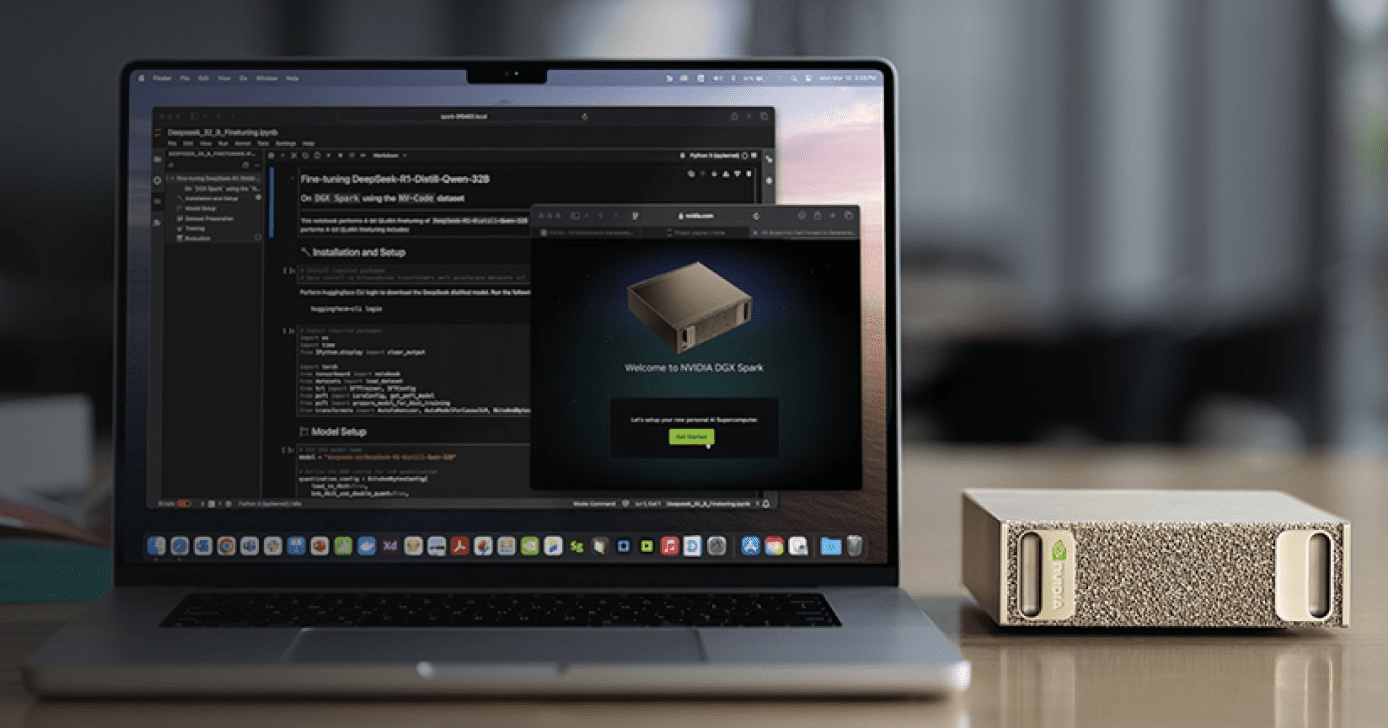
Click Here For Latest Pricing
The NVIDIA DGX Spark is the first desktop hardware to put the full NVIDIA DGX software stack — previously exclusive to six-figure data center systems — into a 1.1-liter box that powers via USB-C. At $3,999 for the 4TB Founders Edition (or ~$3,000 from partners like ASUS with 1TB storage), it occupies a genuinely new category in AI hardware.
But “new category” doesn’t mean “right for everyone.” After months of community benchmarks, developer forum discussions, and independent reviews, a much clearer picture has emerged of what the DGX Spark actually does well, where it struggles, and who should seriously consider buying one.
This guide cuts through both the marketing hype and the reactionary criticism to give you a grounded, technical assessment.
What You’re Actually Getting: Hardware at a Glance
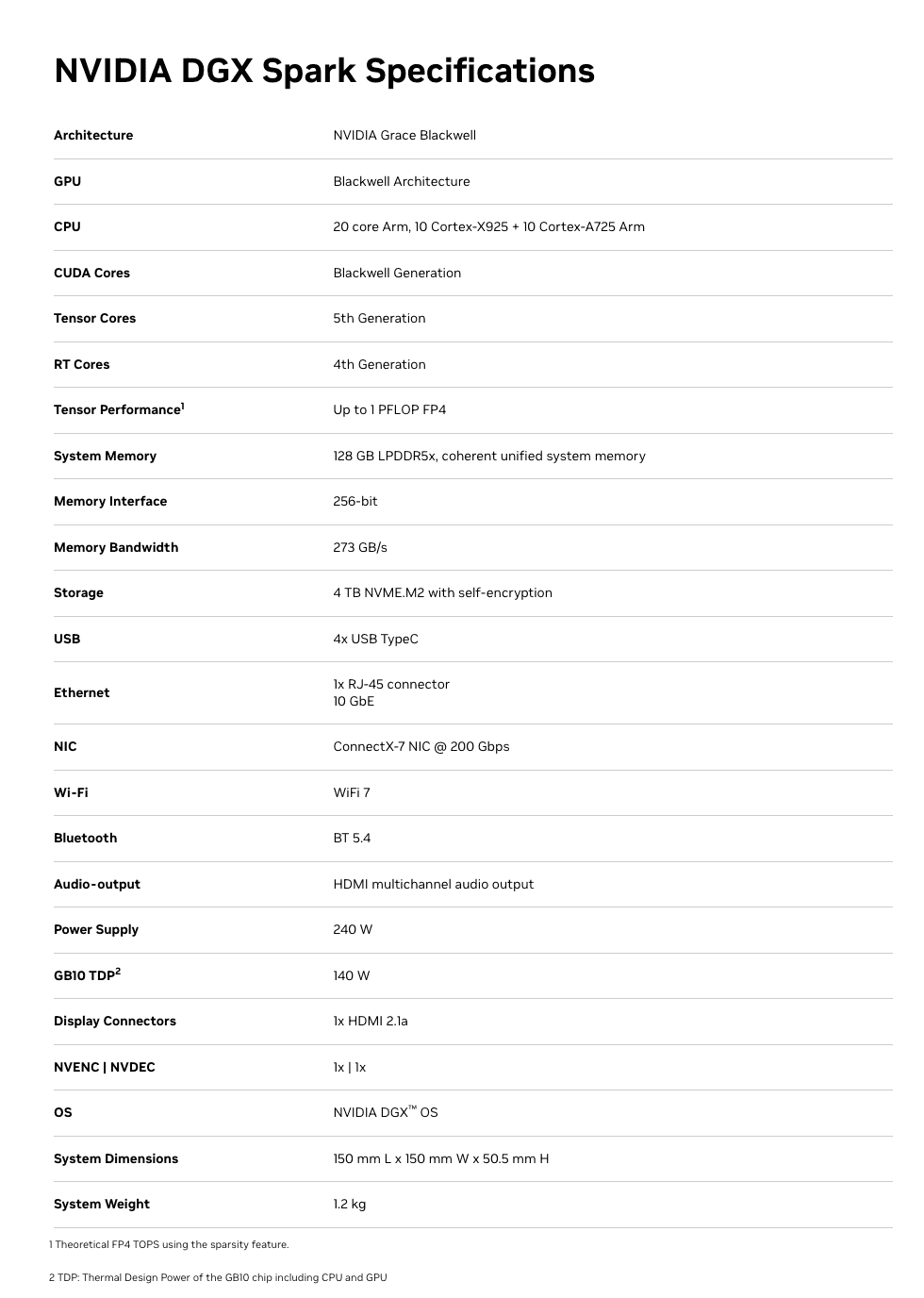
At the heart of the DGX Spark is the GB10 Grace Blackwell Superchip — an ARM-based CPU (10 Cortex-X925 + 10 Cortex-A725 cores) connected via NVLink-C2C to a Blackwell-generation GPU with 5th-gen Tensor Cores and native FP4 support.
The specs that matter:
- 128GB unified LPDDR5X memory — shared coherently between CPU and GPU, no PCIe transfer bottleneck
- 273 GB/s memory bandwidth — this is the number that defines real-world inference speed (more on this below)
- Up to 1 PFLOP of FP4 AI compute (with structured sparsity — the caveat matters)
- 6,144 CUDA cores — comparable to an RTX 5070-class GPU
- ConnectX-7 200GbE networking — two Sparks can cluster for models up to ~405B parameters
- ~240-300W total system power via USB-C
- DGX OS (Ubuntu-based) pre-installed with CUDA, cuDNN, TensorRT, NCCL, PyTorch, and NVIDIA’s full AI software stack
- NVMe storage: 1TB or 4TB options
Full Spec Sheet:
The unified memory architecture is the defining feature. Unlike a discrete GPU setup where 24GB of VRAM sits behind a PCIe bus separated from system RAM, the Spark’s entire 128GB memory pool is directly accessible by both the CPU and GPU. This eliminates the data transfer overhead that plagues consumer GPU workflows and is the reason a 70B model that won’t fit on an RTX 4090 loads directly into memory on the Spark.
Click Here To Learn More About DGX Spark
Real-World Performance: What the Benchmarks Actually Show
This is where nuance matters enormously. The DGX Spark has a split personality in benchmarks, and understanding why will tell you whether it fits your workflow.
Where It’s Genuinely Strong: Prompt Processing (Prefill)
The Blackwell GPU’s tensor cores shine during the compute-bound prefill phase — processing your input prompt before generating a response. Independent benchmarks from the llama.cpp community show impressive numbers:
- GPT-OSS 120B (MXFP4): ~1,725–1,821 tokens/sec prompt processing
- Llama 3.1 8B (NVFP4): ~10,257 tokens/sec prompt processing
- Qwen3 14B (NVFP4): ~5,929 tokens/sec prompt processing
For context, that GPT-OSS 120B prefill speed is faster than a 3×RTX 3090 rig (~1,642 tokens/sec) and roughly 5× faster than an AMD Strix Halo system (~340 tokens/sec). If your workload involves ingesting large contexts — RAG pipelines, long document analysis, code review — the Spark handles the input processing phase exceptionally well.
Where It’s Honest-to-God Slow: Token Generation (Decode)
Here’s the reality check. Token generation — the part where you’re waiting for the model to type its response word by word — is memory-bandwidth-bound. And 273 GB/s, while respectable for LPDDR5X, is a fraction of what discrete GPUs offer.
The numbers are clear:
- GPT-OSS 120B: ~35–55 tokens/sec (depending on quantization and backend)
- Llama 3.1 8B: ~36–39 tokens/sec
- Qwen3-Coder-30B (Q4, 16k context): ~20–25 tokens/sec
- Llama 3.1 70B (FP8): ~2.7 tokens/sec decode
For comparison, a single RTX 5090 generates tokens 3–5× faster on models that fit in its 32GB VRAM, and a 3×RTX 3090 rig hits ~124 tokens/sec on the GPT-OSS 120B model. An Apple Mac Studio M3 Ultra with comparable unified memory capacity also has higher memory bandwidth (~819 GB/s) and generates tokens faster for decode-heavy workloads.
The practical implication: For interactive chat-style use with large models (70B+), the Spark works but feels noticeably slower than what you’d get from a high-end discrete GPU (on models that fit in VRAM) or a maxed-out Mac Studio. For a 120B reasoning model that generates 10k+ tokens per response, waiting at ~35–55 tokens/sec is fine. At 2.7 tokens/sec on a dense 70B in FP8, it’s painful.
Fine-Tuning: The Genuine Sweet Spot
This is where the Spark arguably justifies its existence most clearly. NVIDIA’s published benchmarks show:
- Llama 3.2 3B full fine-tune: ~82,739 tokens/sec peak
- Llama 3.1 8B LoRA: ~53,658 tokens/sec peak
- Llama 3.3 70B QLoRA (FP4): ~5,079 tokens/sec peak
The critical detail: none of these fine-tuning workloads run on a 32GB consumer GPU. QLoRA on a 70B model requires the full model weights in memory plus optimizer states and gradient buffers. The Spark’s 128GB unified memory makes this possible without renting cloud A100s. If you’re iterating on fine-tuned models — adapting them to domain-specific data, private codebases, or specialized tasks — the ability to run these jobs locally, overnight, without cloud billing ticking, is a legitimate advantage.
Dual-Spark Clustering
Two DGX Sparks connected via the ConnectX-7 200GbE interface can run models up to ~405B parameters. NVIDIA demonstrated the Qwen3 235B model achieving ~11.73 tokens/sec generation on the dual setup. The EXO Labs team even combined two Sparks with an M3 Ultra Mac Studio in a hybrid cluster, using the Sparks for prefill and the Mac for decode, achieving a 2.8× speedup over the Mac alone. Interesting for experimentation, though the dual-Spark bundle runs ~$8,000.
Click Here To Learn More About DGX Spark
The Caveats You Need to Know
Being helpful means being honest about the rough edges.
The “1 PFLOP” Marketing Number
NVIDIA’s headline performance figure assumes FP4 precision with structured sparsity — a technique that doubles effective throughput by skipping zero-value operations. Real-world workloads don’t always align with this ideal condition. The actual compute experience is more comparable to an RTX 5070-class GPU. This isn’t dishonest per se (the hardware does achieve those numbers in the right conditions), but it doesn’t map cleanly to most workloads today.
Thermal Behavior
The Spark packs significant compute into a tiny chassis. Multiple users have reported the device running very hot during sustained workloads, with some experiencing throttling or reboots during extended fine-tuning runs. This appears to be an active area of firmware optimization by NVIDIA. If you plan to run multi-day fine-tuning jobs, monitor thermals and ensure adequate ambient airflow around the device.
ARM64 Compatibility
The underlying ARM64 architecture (not x86) means occasional friction with software that assumes an x86 environment. Major frameworks (PyTorch, Hugging Face, llama.cpp, Ollama, vLLM) all support it, and NVIDIA ships playbooks for common setups. But some precompiled binaries may be missing, and niche libraries might need manual builds. The DGX OS smooths most of this, but it’s not zero-friction if you have a complex existing toolchain.
The mmap Bug
A well-documented issue: leaving memory-mapped file I/O (mmap) enabled dramatically increases model loading times — up to 5× slower in some cases. The fix is simple (use --no-mmap in llama.cpp, or equivalent flags in other engines), and NVIDIA has been improving this through kernel updates (6.14 brought major improvements, 6.17 further so). But it’s the kind of thing that trips up new users who don’t know to look for it.
Storage Burns Fast
Large model files in multiple formats (GGUF, safetensors, FP4, FP8) consume storage quickly. Users report burning through 1TB within weeks of active experimentation. The 4TB Founders Edition is worth the extra $1,000 if you plan to keep multiple large models on hand. Alternatively, use network storage, but that adds latency to model loading.
Who Should Seriously Consider This
Strong Fit
AI researchers and data scientists who need to fine-tune large models locally. If you’re regularly running LoRA/QLoRA jobs on 8B–70B models and currently renting cloud GPUs for each experiment, the Spark pays for itself in cloud savings within weeks to months. The ability to kick off a fine-tuning run at your desk overnight, without a billing clock, is genuinely valuable.
Teams working with sensitive data that can’t leave premises. Healthcare, legal, financial, and defense applications where sending data to cloud inference endpoints is architecturally unacceptable. The Spark’s pre-configured DGX OS and local inference stack means code and data never leave your network.
Developers building and testing RAG pipelines and multi-model systems. The 128GB unified memory lets you run an LLM, an embedding model, a reranker, and supporting infrastructure simultaneously. The strong prefill performance means large context ingestion for RAG is fast.
Students, educators, and researchers who want the full NVIDIA AI stack in a portable package. The pre-installed, validated software environment (CUDA, cuDNN, TensorRT, Jupyter, AI Workbench) eliminates days of driver configuration. It’s a functional slice of a data center that you can carry in a backpack.
Physical AI and robotics developers. Edge deployment scenarios, simulations, and digital twin workloads that need GPU compute in a small, low-power form factor.
Weaker Fit
Developers who primarily need fast interactive inference on small-to-medium models. If your main workload is running 7B–13B models for chat or code completion, a Mac Mini M4 Pro ($1,400) or an RTX 5090 ($2,000) delivers comparable or faster token generation at a lower price. The Spark’s advantage only materializes when you need the memory for models that don’t fit on those systems.
Production inference serving at scale. The Spark is a development and prototyping platform. If you need to serve hundreds of concurrent users, you need proper server infrastructure. NVIDIA positions the Spark as the place you build and validate before deploying to DGX Cloud or data center systems.
Users who need maximum token generation speed above all else. If decode throughput is your primary metric, the 273 GB/s memory bandwidth is simply not competitive with high-end discrete GPUs (RTX 5090 at 1,792 GB/s) or even the M3 Ultra Mac Studio (~819 GB/s) for models that fit in those systems’ memory.
The Competitive Landscape: How It Stacks Up
Understanding the Spark’s position requires comparing it against the realistic alternatives.
vs. Apple Mac Studio M4 Ultra (when available) / M3 Ultra
Apple’s unified memory architecture offers higher bandwidth (~819 GB/s on M3 Ultra), which translates to faster token generation for decode-heavy workloads. A maxed-out Mac Studio can be configured with 192GB+ unified memory. For pure inference throughput on large models, Apple silicon currently wins on tokens-per-second at similar price points.
The Spark’s advantage: the full NVIDIA CUDA ecosystem, native FP4 hardware acceleration (NVFP4/MXFP4), TensorRT integration, and seamless model portability to DGX Cloud and data center infrastructure. If your production pipeline runs on NVIDIA GPUs, developing on the Spark means zero code changes when you scale up. If you live in the MLX/Apple ecosystem, the Mac Studio is probably a better fit.
vs. RTX 5090 Desktop
The 5090 is 3–5× faster for inference on models that fit in 32GB VRAM, at roughly half the price. If your models are 13B or smaller (quantized), the 5090 is the clear winner for speed and value.
The Spark’s advantage: 128GB vs 32GB memory means it can run 70B–120B models that the 5090 physically cannot. Different tool for a different job.
vs. Multi-GPU Rigs (2–3× RTX 3090/4090)
Multi-GPU setups offer higher aggregate memory bandwidth and faster decode speeds. A 3×RTX 3090 rig delivers ~124 tokens/sec on GPT-OSS 120B vs the Spark’s ~38 tokens/sec.
The Spark’s advantages: dramatically smaller physical footprint, 170–240W vs 900W+, no PCIe multi-GPU coordination overhead, pre-configured software stack, and the Blackwell FP4 hardware support. It’s a trade-off between raw speed and operational simplicity.
vs. Cloud GPU Instances
A single A100-80GB cloud instance runs $2–4/hour. If you’re doing 4+ hours of compute daily, the Spark pays for itself within 2–6 months depending on your workload. The Spark also eliminates instance availability issues, startup latency, and data transfer concerns. But cloud instances offer access to H100s and multi-GPU configs that far exceed the Spark’s raw performance.
Practical Tips If You Buy One
Based on community experience from the NVIDIA developer forums and independent users:
- Use llama.cpp for single-user inference. It consistently offers the best performance on the Spark with the least overhead. Ollama is convenient but slightly slower. vLLM and TensorRT have steeper setup curves with marginal gains for single-user workloads.
- Always use
--no-mmap. Model loading is dramatically faster. Also use--flash-attnand set-ngl 999to fully load models onto the GPU. - Prefer MoE (Mixture of Experts) models for interactive use. Users report that GPT-OSS 120B (a MoE model) runs surprisingly fast, while dense models of similar size are much slower. MoE models only activate a fraction of parameters per token, making them a much better fit for the Spark’s bandwidth profile.
- Get the 4TB version. Model files are large. You’ll burn through 1TB faster than you think if you’re experimenting with multiple model sizes and quantization formats.
- Clear buffer cache before loading large models. The unified memory architecture can hold buffer cache that isn’t released automatically. Run
sudo sh -c 'echo 3 > /proc/sys/vm/drop_caches'before loading large models to ensure maximum available memory. - Use NVIDIA Sync for remote access. The DGX Dashboard provides remote JupyterLab, terminal, and VSCode integration. You can run the Spark headless on your network and connect from your laptop — a better workflow than connecting peripherals directly.
- Monitor thermals during long runs. Ensure adequate ventilation around the device, especially for multi-hour fine-tuning jobs.
The Bottom Line
The DGX Spark is not the fastest local inference device per dollar. It’s not trying to be. It’s the smallest, most integrated entry point into the NVIDIA DGX ecosystem — a development platform that lets you build on the same software stack that powers enterprise AI infrastructure, in a package you can carry in one hand.
Its genuine strengths are: 128GB unified memory for running and fine-tuning models that can’t fit on consumer GPUs, strong prefill performance for context-heavy workloads, the full pre-configured NVIDIA AI software stack, and a seamless path from local development to cloud/data center deployment.
Its genuine weaknesses are: token generation speed limited by 273 GB/s memory bandwidth, thermal constraints in the compact chassis, and a price point that’s hard to justify if your models fit comfortably on a $2,000 discrete GPU.
For AI builders who have genuinely outgrown 24–32GB of VRAM, who need to fine-tune large models locally, who work with data that can’t touch a cloud, or who need to develop on the same CUDA stack they’ll deploy on — the DGX Spark fills a real gap that didn’t have a clean answer before. Go in with calibrated expectations, and it’s a capable tool. Go in expecting data center performance in a desktop box, and you’ll be disappointed.
The most useful framing comes from the community itself: think of the DGX Spark not as a consumer device, but as a personal development cluster — a functional slice of a data center that fits on your desk and lets you iterate without cloud dependencies. For the right user, that’s exactly what was missing.
Click Here To Learn More About DGX Spark
Download Your FREE
Dev Stack Starter Guide
Build, automate, and launch faster—see the automation stack developers and agencies are switching to.
- ✅ API Templates & Code Snippets
- ✅ Done-for-You Automation Workflows
- ✅ Step-by-Step Funnel & CRM Guide
- ✅ Free for Developers, Freelancers, & SaaS Builders