AI Models Don’t “Think.” They Predict.
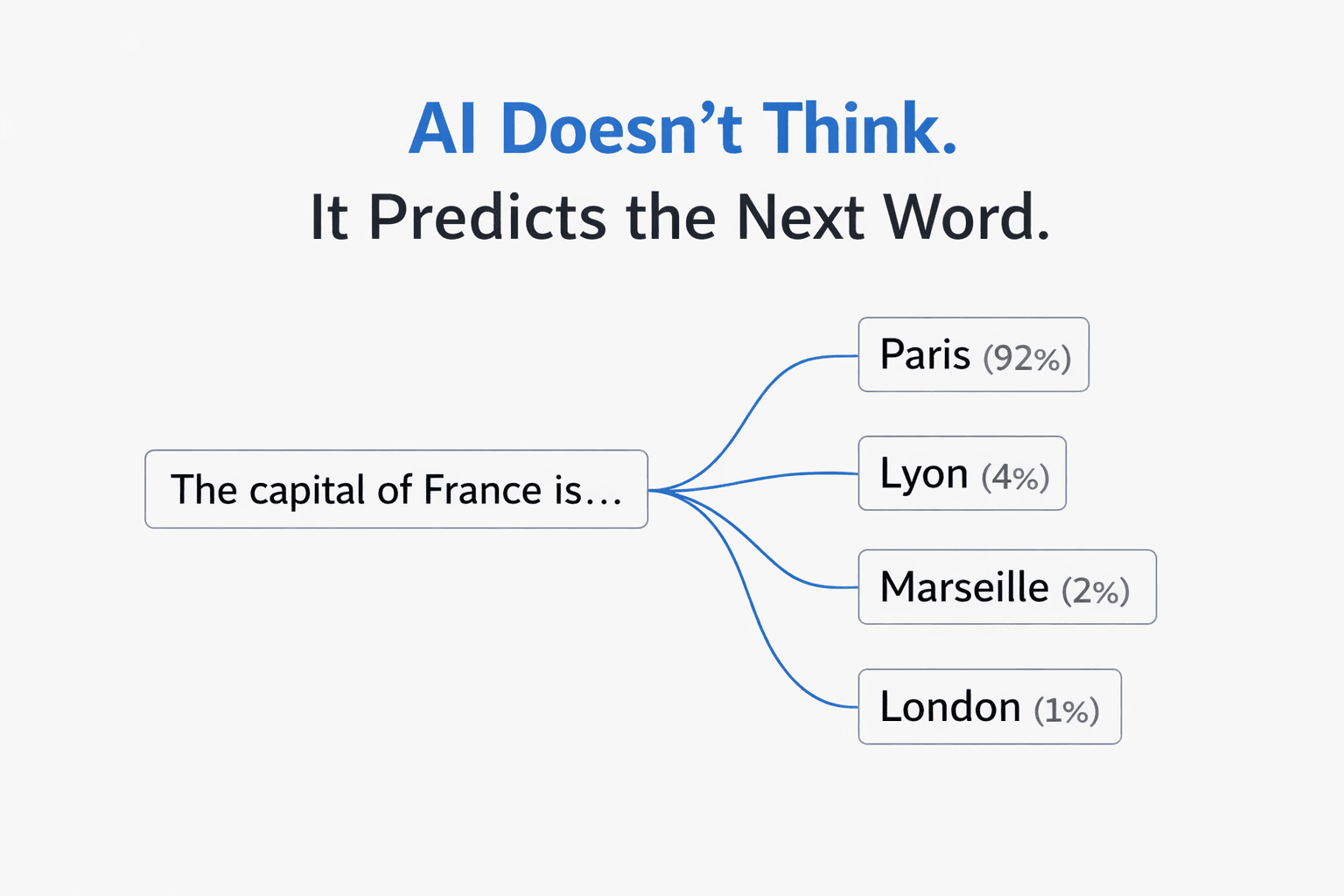
AI Models Don’t “Think.” They Predict.
The single most important thing to understand: a large language model is a prediction engine. It reads your entire prompt, then predicts the next word (technically, the next “token”) based on statistical patterns from its training data. Then it predicts the next word after that. And the next. One at a time, until it builds a full response.
It does not plan ahead. It does not understand your intent. It does not “know” anything. It recognizes patterns and predicts what text is most likely to follow the text you gave it.
This has a profound implication: the quality of the prediction is entirely determined by the quality of the input. Better input patterns produce better output patterns. That’s the whole game.
Every effective prompting technique — including KERNEL — works because it gives the prediction engine a higher-quality input pattern to work from.
Why “Simple” Is the Wrong Frame
The KERNEL framework starts with “Keep it simple” — suggesting that shorter prompts with less context produce better results. And for basic code tasks, that’s often true.
But the underlying principle isn’t simplicity. It’s signal-to-noise ratio.
Language models use something called an attention mechanism — a system that decides which parts of your prompt to focus on when generating each word. When your prompt is full of irrelevant context, the attention mechanism gets diluted. The model pays attention to everything equally, including the noise, and the output quality degrades.
This is why a 500-word prompt full of background rambling produces worse results than a 50-word focused prompt. But it’s also why a 500-word prompt that’s well-structured — with clear sections, labeled data, and the task at the end — can dramatically outperform the short version for complex tasks.
The “Lost in the Middle” Problem
There’s a well-documented phenomenon in language model research: performance drops by up to 30% when critical information is placed in the middle of a long prompt, compared to placing it at the beginning or the end.
The model’s attention is strongest at the start and end of your input. The middle gets less focus — it’s the cognitive equivalent of someone’s eyes glazing over during a long meeting.
This explains why the KERNEL framework’s “Logical structure” rule works so well. When you put your context first and your task last, you’re placing information exactly where the attention mechanism is strongest:
| Position | What to Place Here | Why |
|---|---|---|
| Beginning | Background data, documents, context | Strong attention. Gets processed and retained. |
| Middle | Examples, rules, formatting guidance | Weakest attention. Keep this structured and labeled. |
| End (last line) | Your specific task or question | Strongest attention. The model generates its response from here. |
This is the theoretical basis for why structured prompt frameworks (like the Bento-Box method) consistently outperform unstructured prompts — even when they contain the same information.
Why Positive Instructions Beat Negative Constraints
The KERNEL framework recommends telling AI “what NOT to do.” This is one area where the empirical advice conflicts with the research.
Both Anthropic and OpenAI’s documentation specifically recommend positive framing over negative constraints. Here’s why it matters at the model level:
When you write “don’t use external libraries,” the model has to process the concept of external libraries, recognize it as something to avoid, and then navigate around it. But the prediction engine doesn’t have a clean “avoidance” mechanism — it processes the concept either way, and the mere presence of “external libraries” in the prompt can increase the probability of those tokens appearing in the output.
❌ Negative framing
“No external libraries. No functions over 20 lines. Don’t use global variables.”
✅ Positive framing
“Use only Python standard library. Keep each function under 20 lines. Use local variables with descriptive names.”
Same constraints. Different framing. The positive version gives the model a clear target pattern to follow, rather than a pattern to avoid.
Why Examples Work Better Than Descriptions
The KERNEL framework doesn’t explicitly cover few-shot prompting (providing examples), but this is one of the most powerful techniques available — and the theory explains why.
When you describe what you want (“write professional, concise emails”), the model has to interpret those adjectives and map them to a style. That interpretation is fuzzy. “Professional” means different things in different contexts.
When you show what you want (by providing 3–5 examples of the input-output pattern), you’re giving the model a concrete statistical pattern to match. It doesn’t have to interpret anything — it just extends the pattern you’ve established.
The Temperature Variable Most People Miss
Every prompt framework focuses on the words you write — but there’s a hidden variable most people never adjust: temperature.
Temperature controls how the model navigates its probability list when choosing each word. At temperature 0.0, it always picks the highest-probability word (deterministic, consistent, factual). At temperature 1.0, it samples more broadly from the distribution (creative, varied, surprising).
This is why the same prompt can produce wildly different results on different days — and why KERNEL’s “Reproducible results” principle is harder to achieve than it sounds. If you’re using a web chat interface, the temperature is set for you by the platform. But if you have access to settings or are using an API, matching the temperature to the task type is one of the highest-leverage adjustments you can make.
| Task Type | Ideal Temperature | Why |
|---|---|---|
| Code, math, data extraction | 0.0 – 0.2 | One correct answer. No creativity needed. |
| Business writing, emails | 0.5 – 0.7 | Professional but not robotic. |
| Brainstorming, creative writing | 0.8 – 1.0 | Many possible good answers. Variety is the goal. |
Where Frameworks Like KERNEL Fall Short
To be clear: KERNEL is a good framework. If you’re a developer writing code prompts, following it will improve your results significantly.
But it has three limitations worth noting:
1. It’s code-focused. The examples are all about scripts and data processing. Most people using AI aren’t writing code — they’re writing emails, creating content, analyzing data, learning new topics, making decisions. The principles are similar, but the application looks very different.
2. It doesn’t cover multi-turn interaction. One of the most powerful prompting techniques available in web chat interfaces is using follow-up messages to iteratively refine output. Most beginners treat their first prompt as the final product. In practice, the conversation is the prompt.
3. It’s model-agnostic by design — but models aren’t interchangeable. Claude handles XML-structured prompts better than any other model. GPT’s Structured Outputs can guarantee 100% JSON schema compliance. Gemini can process 2 million tokens of context at once. Knowing these model-specific strengths lets you choose the right tool for the job.
The Practical Version
Understanding why prompts work is useful. But what most people actually need is a set of practical, actionable best practices they can apply immediately — across any model, any task, any experience level.
I put together a comprehensive breakdown of the techniques that consistently produce better AI output, with before/after examples, decision frameworks, and ready-to-use patterns:
→ AI Prompt Engineering Best Practices: The Complete Guide
It covers the 5-Part Prompt Formula, the three core techniques (Zero-Shot, Few-Shot, Chain-of-Thought), when to use each one, the most common mistakes, and model-specific tips for ChatGPT, Claude, and Gemini.
If you found the theoretical breakdown here useful, that post is the practical playbook.